Ubuntu OpenVPN Cannot Access Public Internet Resources
YoungForest · https://youngforest.github.io/en/2021/03/18/Ubuntu-vpn-cannot-access-public-resource/
Because of research needs, I needed to connect to the Hangzhou Research Institute VPN before I could use GPUs for neural network training tasks.
However, after configuring OpenVPN on Ubuntu 18.04, I found a difficult problem: after connecting to the VPN, I could not access the public Internet, such as Baidu and similar websites. These were not sites outside the Great Firewall, but the “external network” relative to the local intranet. After disconnecting the VPN, I could access the public Internet, but could not access Hangzhou Research Institute resources. Since in daily work both the public Internet and the Hangzhou Research Institute intranet are basically indispensable, I spent two days investigating and fixing this problem. Also, other classmates using the VPN did not have similar issues, so I believed this was a problem specific to Ubuntu. The fix itself was simple, but the process of locating the problem was very bumpy.

Symptoms
After connecting to the VPN, I could ping Baidu’s IP address, but the browser could not open Baidu, and I also could not directly ping baidu.com. The browser could only open Hangzhou Research Institute and BUAA internal websites.
My initial judgment was that it was a DNS server issue, but after investigation I found the DNS configuration had no problem.
My guess was that when accessing external resources, the expected DNS resolution had no way to complete.
After searching online for quite a while, I finally found the real problem, which was the local VPN configuration, and the solution.
Solution
The most similar problem and solution I found online
Since I was on Ubuntu 18.04, it was not quite the same.
Here is my full solution for reference.
Open the VPN configuration.
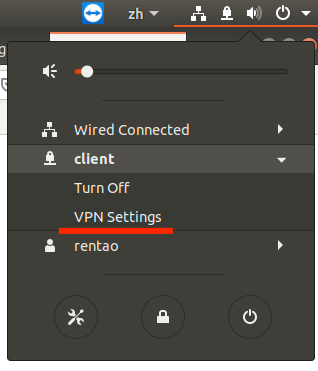
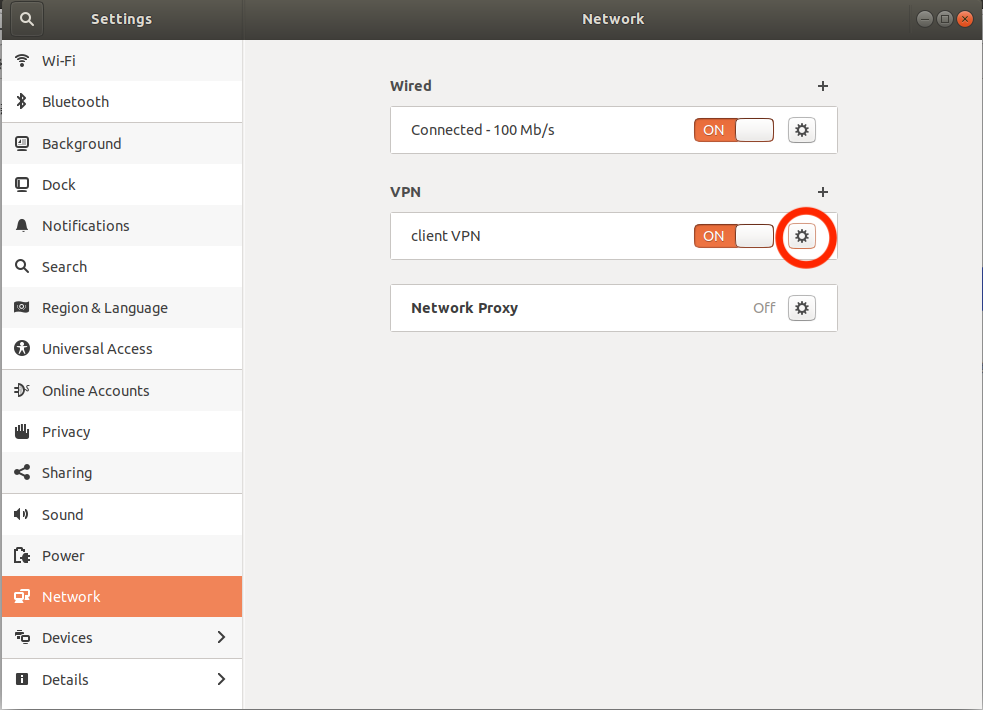
Check “Use this connection only for resources on its network”.
After applying, reconnect the VPN and the problem should be solved.
Postscript
Next, I will try setting up a jump host on Ubuntu. This way, my Mac may be able to connect to Hangzhou Research Institute machines through that jump host. (It has already succeeded. The next post is updated here.)